Product before-and-after
Start on a plain product shot and end on the styled hero image, letting the AI animate the reveal for a store listing or ad.

Upload a start image and an end image and let this ai video generator start and end frame tool fill the motion between them — every in-between frame is generated, so your first picture flows smoothly into your last.
Per image · JPG, PNG or WebP · up to 20.0 MB · up to 6000×6000px
Sign in with Google — eligible Gmail or googlemail accounts get free signup credits, no card needed to start. Set a first and last frame and generate the video between them in minutes.
Reviewed by ImgVid TeamUpdated
See it in action
Real clips where a start image morphs into an end image — see how the AI invents the whole motion path between your two frames.
How it works
Three steps take you from two still pictures to a finished clip — this ai video generator start and end frame flow is free to start, and every export is watermark-free.
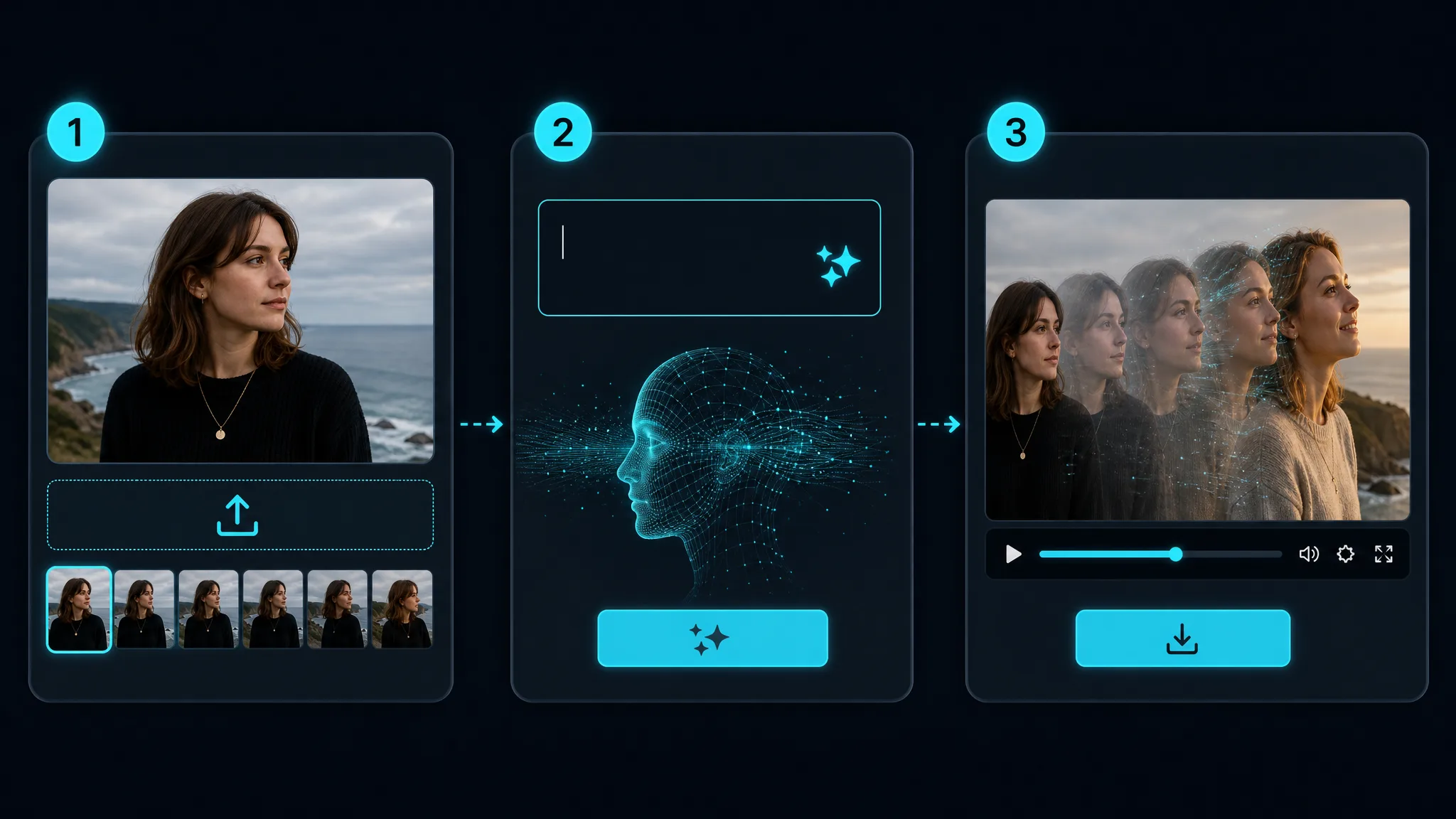
Sign in with Google, then drop in the start image — the picture your video should open on. This is where your motion begins, so choose a clean, well-lit frame with a clear subject. A high-resolution start frame gives this first and last frame ai more detail to animate from.
Upload the last image — the picture your video should finish on. The closer your start and end frame share a subject, framing, and lighting, the smoother the transition. This is the ai video generator start image end image step: the model reads both frames and plans the path between them.
Pick an AI model and, when available, an aspect ratio, then generate. The model invents every in-between frame so your first picture flows into your last, and returns a playable clip in minutes. Preview it, tweak the frames or prompt to change the motion, then download the finished video — watermark-free.
What you can do
Give the model a start image and an end image and it generates the entire path between them. This ai video generator start image end image workflow means you control exactly where the shot begins and ends, and the AI handles all the frames in the middle.
Set your two framesMorph one scene into another with a first and last frame to video render — a face that changes expression, a season that shifts, or a product that transforms. No keyframing and no timeline, just two pictures and a generate button.
Create a transitionBecause you pin both ends, a start end frame ai render is more predictable than a text-only prompt. You decide the opening and closing frame, so the motion lands where you want instead of drifting off in a random direction.
Upload a first and last frameRun this start and end frame ai video free in the browser — nothing to install. Eligible accounts start on free signup credits, and every clip downloads watermark-free. A first and last frame ai video is yours to post anywhere.
Generate a free clipWhy imgvid
A free-to-start ai video generator start and end frame that gives you both ends of the shot and lets the AI fill the motion — cinematic and watermark-free.
Unlike a one-image animator, this first and last frame ai lets you set the exact opening and closing frame, so the generated motion goes exactly where you intend it to.
The model generates brand-new frames along the path from your start frame to your end frame — a true first and last frame to video result, not a crossfade or dissolve between two stills.
Turn two pictures into a film-style transition with smooth movement and lighting, ready for reels, ads, and hero sections without a video editor.
Switch between start end frame ai models to match your subject and budget — no separate accounts and no per-model checkout to run a start and end frame render.
Most clips finish in under a minute, so you can swap frames, retune the motion, and pick the best take instead of waiting on a render queue.
Sign in with Google and eligible accounts get free signup credits, with watermark-free clips and no card needed to begin — a start and end frame ai video free for anyone to try today.
Use cases
From product reveals to expression changes, here is what creators build with a first last frame ai once they can set a first and last frame to video.
Start on a plain product shot and end on the styled hero image, letting the AI animate the reveal for a store listing or ad.
Take a neutral portrait as the first frame and a smiling one as the last, and generate a natural change of expression in between.
Morph a rough sketch first frame into a finished render last frame for a satisfying design-process clip.
Blend two locations or two times of day into one seamless transition for a travel edit, intro, or music video.
Show a room, a plant, or a character changing from a start state to an end state with lifelike, AI-generated motion.
Set a simple mark as the start frame and a full logo lockup as the end frame to animate a clean brand reveal.
FAQ
An AI video generator start and end frame tool takes two still images. Given a first frame and a last frame, it generates the motion that connects them. The AI predicts every in-between frame, so your start image flows into the end image as a short, watermark-free clip.
You provide two pictures — a start frame and an end frame — and the model generates brand-new frames to fill the gap. Because you pin both ends, a first and last frame to video render opens on your first image and closes on your last, with real motion in between.
Sign in with Google and upload two images. Use the start image where your shot begins and the end image where it finishes, then pick a model and, when available, an aspect ratio and generate. This ai video generator start image end image flow works best when the two frames share a subject and lighting.
It is free to start. Generation requires Google sign-in, and eligible Gmail or googlemail accounts get free signup credits — no card needed to begin. That means you can run a start and end frame ai video free to try it, with no subscription required just to test a first frame and last frame.
A reference-to-video tool uses one reference image to guide a clip’s style while the AI decides the motion. A start and end frame tool instead takes two frames and fills the motion between them — use start end frame ai when you know exactly how the shot should open and close.
A crossfade or slideshow simply dissolves one picture into another with no real movement. This first and last frame ai generates entirely new frames along the path between your two images, so subjects actually move, morph, and transform.
Two clear, high-resolution images that share a subject, camera angle, and lighting give the smoothest result. A start frame and end frame that are related — the same face, product, or scene — animate far more convincingly than two unrelated pictures.
Yes — your two frames already define where the motion starts and ends. You can add a short prompt and choose a model to steer the speed and style of the movement. If the first result is not quite right, adjust the frames or the prompt and regenerate for a different take.
You can generate vertical (9:16), square (1:1), and widescreen (16:9) clips. Your first and last frame to video fits TikTok, Instagram Reels, YouTube, or a website hero when the selected model and mode expose an aspect control; auto-framing image modes follow the uploaded image, so prepare the source in the target shape before upload.
Generation requires a free Google sign-in. That keeps your credits, uploads, and history tied to your account, and you need zero editing experience. There is no timeline and no keyframing — you only upload a first and last frame ai pair and let the model do the rest.
Exports are designed to be watermark-free. Clips you generate from your own first and last frames are clean and yours to use in ads, listings, and social posts. Just make sure you hold the rights to both source images you upload.
More tools
Sign in with Google, set a first and last frame, and let the AI fill the motion — free signup credits, watermark-free output.
Try the AI video generator start and end frame