First birthday keepsakes
Give grandparents a birthday ai reel from the cake-smash photo, not another still.

Upload one picture and this birthday ai reel maker generates real motion inside it — a few seconds of candles, confetti, or laughter you can send before the day is over.
Per image · JPG, PNG or WebP · up to 20.0 MB · up to 6000×6000px
Sign in with Google — eligible Gmail or googlemail accounts get free credits, no card needed to start. Upload one birthday photo, describe the moment, and get a shareable clip in minutes.
Reviewed by ImgVid TeamUpdated
See it in action
Each clip below came from a single still. No footage was filmed, and nothing was stitched together from an album.
How it works
Three steps and one picture. Free to start with the credits you get from signing in, and every export leaves without a watermark.
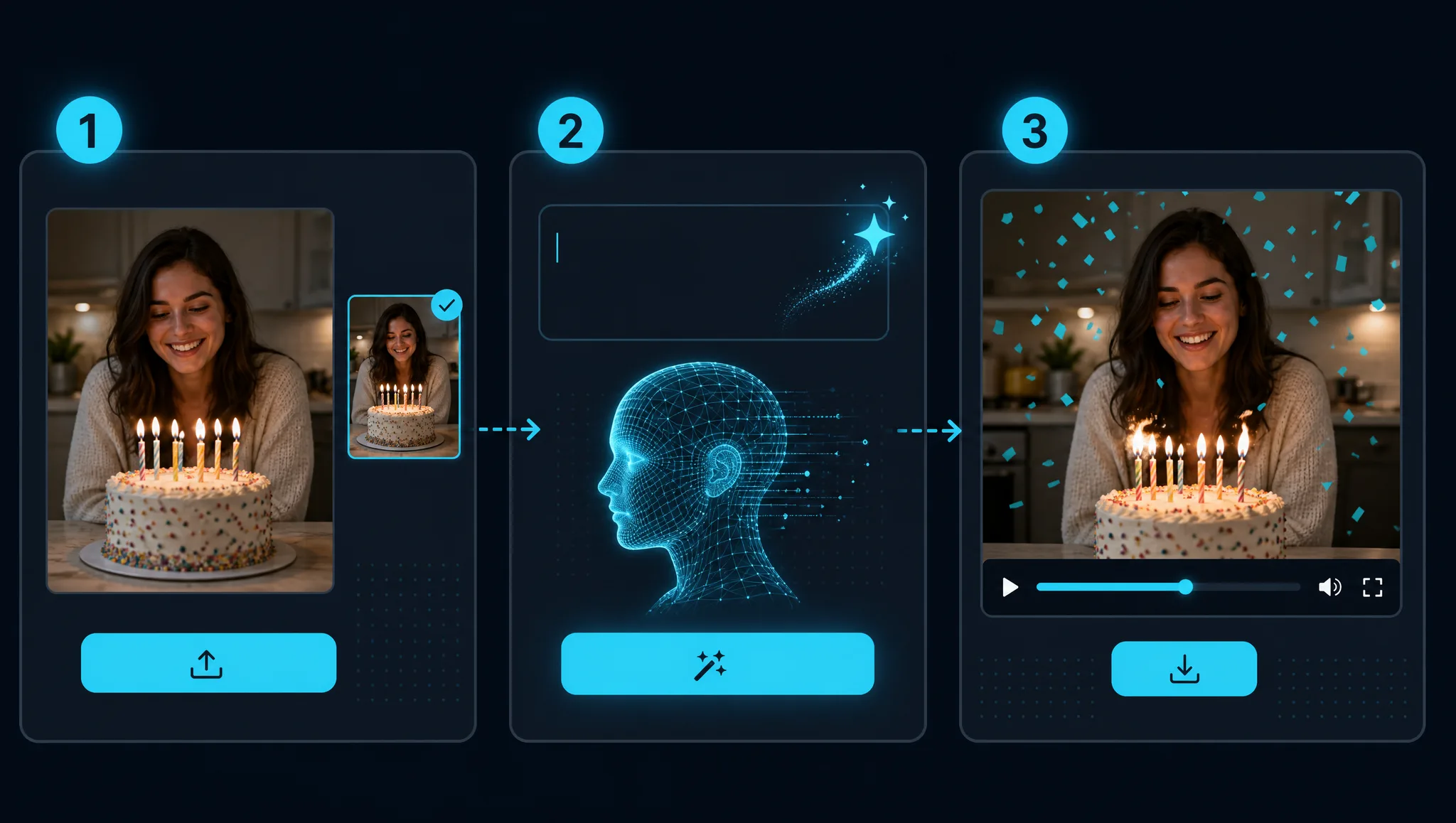
Sign in with Google and upload a single image — the cake, the candles, a group shot, or a portrait of the person whose day it is. This birthday ai reel maker takes one picture per render: no album upload, no multi-photo stitching, so choose the frame you would have posted anyway. Phone photos work fine.
Describe the moment in a sentence: "candles flicker, slow push-in, warm room light" or "confetti falls, everyone laughs". Naming the motion matters more than naming the occasion. On models that return sound you can describe a musical mood in words — there is no track upload or song library here.
The model builds new frames from your still and hands back a short clip. Re-run with a different prompt if the movement misses — renders land in about a minute. Download it watermark-free for a story, a group chat, or a message that arrives before midnight.
What you can do
Used as a baby birthday video maker, this takes the one cake-smash frame that turned out and gives it genuine movement — useful for a first birthday, and equally for a sixteenth, a thirtieth, or a ninetieth where somebody already took the photograph.
Animate a first birthday photoAn online birthday video maker with photos free at the outset is mostly about whether the first try costs anything. Sign in with Google, spend a few of the credits eligible accounts get, and see what one candle shot turns into.
Try it on one photoYou do not need a shoot. Every birthday ai reel here starts from photos you already have — create birthday video with photos from the camera roll, the group shot, the blurry candle moment — and the model builds motion into whichever frame you pick.
Use a photo from the dayA happy birthday video maker online free enough to test at short notice is really about speed. Upload an avatar or a candid, and a birthday ai reel comes back in minutes rather than an evening lost to an editing app.
Make a birthday greetingWhy imgvid
Most birthday tools slide a camera over pictures you already have. This one makes the picture itself move.
Candles flicker and faces shift because the model invents frames inside the image — cross-fades cannot do that.
Confetti, slow motion, warm light, chaos — describe it and the render follows.
Renders finish in about a minute — it matters when you remembered at nine in the evening.
Cake shots, blurry candids, old scans and profile pictures all animate.
Clips come out shaped for Reels, Stories, and Shorts, so nothing gets cropped when you post it.
Sign in with Google and eligible accounts get free credits. No card to begin, and no stamp across the finished clip.
Use cases
One uploaded picture, six different things people actually send on the day.
Give grandparents a birthday ai reel from the cake-smash photo, not another still.
An ai birthday wishes video maker free to start turns a card design into a few seconds of motion that plays inline in a chat.
Drop a confetti clip into the chat at midnight so the notification is part of the surprise.
Post a birthday ai reel from the one photo everybody already liked.
An ai dog happy birthday video from one photo of a dog in a party hat — visibly pleased with itself, not just sitting there.
Make a clip from a team photo for a colleague celebrating remotely.
FAQ
A birthday ai reel is a short vertical clip generated from one birthday photograph. The AI predicts new frames from that single still, so candles flicker, confetti falls, and people move — instead of a camera panning across a photo that never changes. As a birthday reel video maker it takes one image, a description of what should happen, and returns a file you download.
No to both — one photo per render, and no template downloads. These are real product limits, not plan restrictions: every clip is generated fresh from the photo you upload, which is why two people using the same prompt still get different results. For several moving moments, animate the photographs one at a time and join them in your own editor.
Not by uploading one. Some models generate sound from your prompt, so you describe the mood in words rather than supplying a file. Neither a track upload nor a song catalogue exists here — that is the main way this differs from a happy birthday video maker with photos and a music picker. For one exact song, add it in your own editor.
Yes, and it is one of the better uses. A baby birthday video maker really only needs the one frame that turned out — a cake smash, a highchair candid, a first-birthday portrait. The model adds movement to that image, which tends to read as a keepsake rather than a gimmick when it reaches grandparents.
Free to start, then metered in credits. Signing in with Google gives eligible Gmail or googlemail accounts credits to begin — no card and no subscription just to try it. Each render spends credits, so the free allowance is there for experimenting rather than endless output. You can top up if you keep making clips.
Yes — create birthday video with photos you already took, one picture per render. A clear shot with a readable expression works best; cake, candles, and party lighting give the model useful cues. Even a birthday profile picture ai video works from an avatar crop. Very dark or heavily blurred images still animate, but the movement tends to be gentler.
Yes — the prompt is where the humour comes from. To make funny video for bithday with photo material you already have, ask for exaggerated slow motion, dramatic lighting, or a camera move far too serious for the moment. An ordinary candid becomes a joke clip. Describing the tone explicitly works better than describing the occasion.
Vertical, square, or widescreen, with no watermark. The shapes available depend on the model and mode you choose, so clips fit Reels, Stories, TikTok, or a message thread without cropping. Nothing is stamped across the frame on any plan.
Yes — same one-image flow. Upload the card artwork and a birthday invitation card video maker free to start turns it into a few seconds of motion that plays inline in a chat. As an ai birthday wishes video maker free of any editing step, and a birthday card video maker free to try, the first result costs nothing.
Yes, and it is one of the more forwarded results. An ai dog happy birthday video needs one photo of the animal — a party hat helps the frame read as a birthday — and the model adds movement a still cannot show. Cats and rabbits work the same way; only singing or lip-synced clips are out of reach.
Both animate one photograph, but the examples and prompt ideas differ. This page is built around cake, candles, milestones, and joke clips. If you are making something for a ceremony, an engagement shoot, or an anniversary, the wedding photo to video page is tuned for those moments instead.
More tools
Sign in with Google, upload one photo, and download a moving birthday clip in minutes — free credits to start, watermark-free output.
Create a birthday ai reel