Short-form social
Turn one photo into a vertical clip so a TikTok or Reels feed keeps moving on days when there is nothing new to film.

Animate a still picture into a short AI clip. imgvid is a grok image to video free alternative — upload a photo, describe the motion, and download a watermark-free video without a Grok account.
Per image · JPG, PNG or WebP · up to 20.0 MB · up to 6000×6000px
Sign in with Google — eligible Gmail or googlemail accounts get free signup credits, no card needed to start. Bring your images to life with cinematic motion right away.
Reviewed by ImgVid TeamUpdated
See the motion
Every clip below started as one still photo. imgvid generates new in-between frames, so the subject genuinely moves instead of the camera panning across a flat image.
Step by step
Three steps: upload a photo, describe the motion, download the clip. Free signup credits cover your first renders and every export is watermark-free.
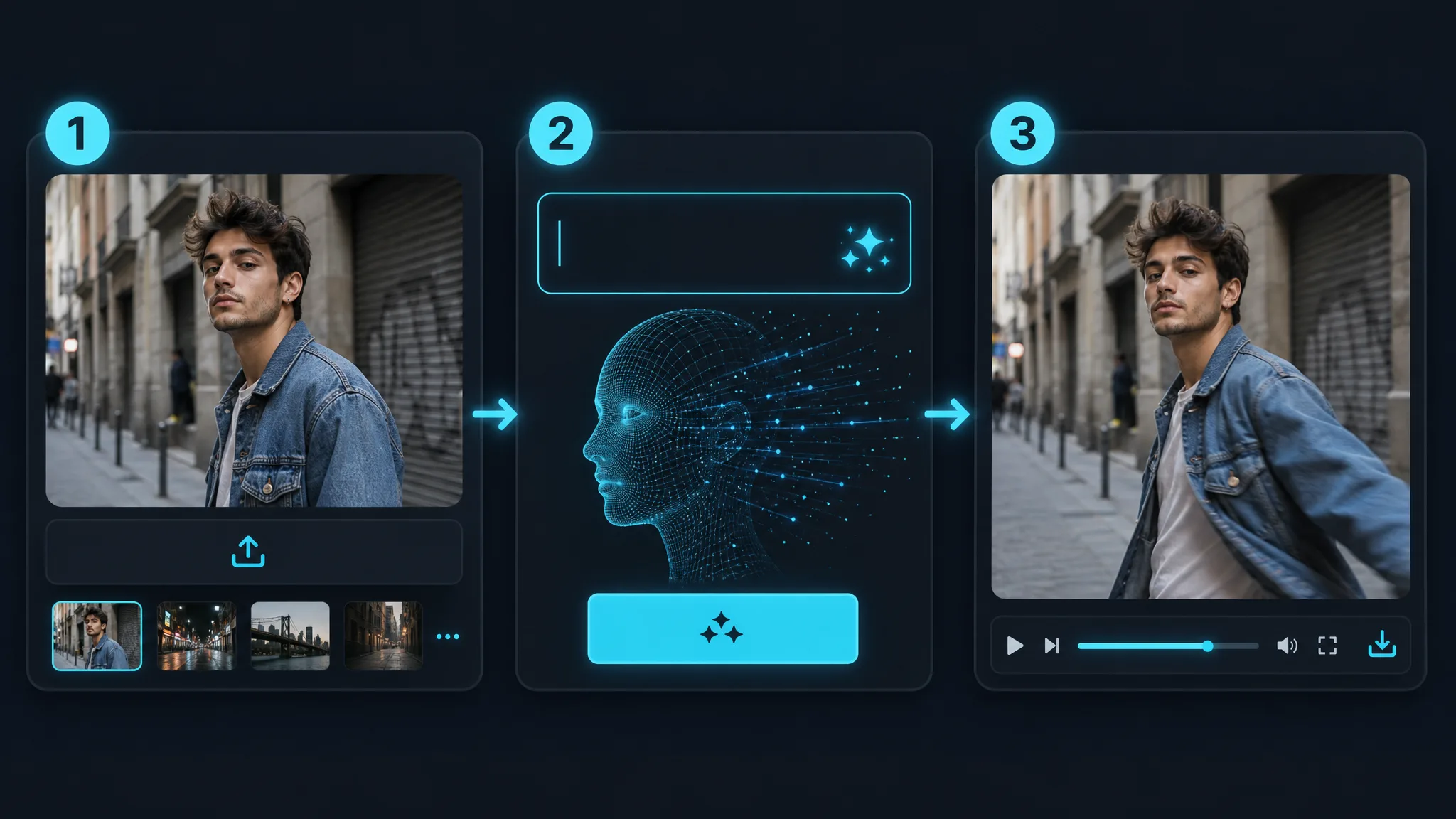
Sign in with Google, then drop in any JPG or PNG — a portrait, product shot, sketch, or an image you generated elsewhere. A clear subject with clean lighting and an uncluttered background gives the model the most detail to work with, which is what separates a convincing render from a mushy one.
Write one plain sentence for what should move and how the camera behaves — "slow dolly in, hair moving in the breeze, cinematic grade" is already enough direction. Then pick an AI model and an aspect ratio: 9:16 for Reels and Shorts, 16:9 for YouTube, 1:1 for feed posts.
The model predicts brand-new frames from your single image and hands back a playable clip, usually inside a minute. Preview it, regenerate with a different prompt if the motion missed, then download the finished video watermark-free.
What you get
Grok Imagine is built around generating images. imgvid is built around the step after that — taking a picture you already have and giving it real motion.
imgvid predicts new frames inside your picture, so hair sways, water ripples, and the camera pushes in. It is a real image to video ai render, not a Ken Burns pan that slides across a static file and calls it a video.
Animate a photoDescribe the shot the way you would to a camera operator — a slow orbit, a gentle breeze, a rack focus onto the subject. There are no keyframes to set, no motion curves to tune, and no editing timeline to learn.
Write a promptYou do not need an X subscription or a Grok login to use imgvid. Sign in with Google once and you can start rendering, with free signup credits covering your first clips and watermark-free downloads throughout.
Start renderingWhy pick imgvid
imgvid is an independent tool, not Grok and not xAI. It exists to cover one job well: turning a picture you already have into a short, shareable video.
You get the same thing people want from a Grok-style workflow — cinematic camera moves and lifelike movement out of one still frame — through imgvid own set of video models.
Swap between Veo 3.1, Runway Gen-4 Turbo, Kling 3.0, Seedance 2.0, and Wan 2.7 to suit the subject and your budget. One account, no separate checkout per model.
Most renders land in under a minute, so trying four prompts and keeping the best take is realistic rather than an afternoon spent waiting in a queue.
People, pets, products, sketches, screenshots, and AI-generated art all animate. Nothing about the workflow assumes a particular source or a particular generator.
Render vertical, square, or widescreen before you generate, so the clip drops straight into Reels, Shorts, YouTube, or a site hero without a re-crop.
Eligible Google accounts receive free signup credits, no card is needed to start, and finished clips download without an imgvid watermark stamped on them.
Where people use it
The same upload-and-prompt loop covers social content, storefront assets, and personal archives. These are the jobs it gets used for most.
Turn one photo into a vertical clip so a TikTok or Reels feed keeps moving on days when there is nothing new to film.
Animate a flat product image into a rotating hero clip for a listing, a paid placement, or an email banner.
Give a headshot a slow push-in and subtle motion for a channel intro, a podcast cover, or an animated profile.
Bring a drawing, painting, or generated still to life with drifting motion so the piece reads as a moving artwork.
Give an old or faded photograph gentle, believable movement so a still memory becomes something worth sharing again.
Convert a scenic shot into a living wallpaper where clouds travel, water moves, and the light slowly changes.
Questions
It means animating a still picture into a short AI video clip without paying upfront. Because Grok is best known for chat and image generation, people searching this phrase are usually looking for a tool that handles the motion step. imgvid does exactly that: upload a photo, describe the movement, and the model renders realistic in-between frames so a static shot becomes a few seconds of footage.
No — imgvid is an independent tool, is not Grok, is not xAI, and is not affiliated with either. It is a Grok alternative for one specific job — turning an image you already have into a video — and it runs on its own set of video models rather than anything from xAI.
No — imgvid does not generate images. It takes a picture you supply and animates it. If you created that picture in Grok Imagine or any other image generator, you can upload it here and turn it into a clip, but the image itself has to come from somewhere else.
No — imgvid has no connection to Grok or X, so your X account is irrelevant here. It runs as an independent grok image to video free website: you sign in with Google once, which keeps your credits, uploads, and render history attached to your account, and then you can start generating clips.
Generation needs a Google sign-in, and eligible accounts get free signup credits. That means the first clips cost nothing: no card is needed to begin and there is no subscription just to try it. Credits are consumed per render, so heavier use eventually needs a top-up.
No — exports are watermark-free. Clips generated from your own images come back clean and are yours to use in ads, listings, and social posts. Do make sure you hold the rights to whatever you upload, which matters most for photographs of other people, licensed artwork, and branded products.
Clear, high-resolution images with one obvious subject work best. Portraits, products, pets, landscapes, sketches, and restored photos all render well. A well-lit subject against an uncluttered background gives the model an unmistakable thing to move and fewer competing details to reconstruct, which is usually the difference between convincing motion and a warped frame.
You can render vertical 9:16, square 1:1, and widescreen 16:9, each a few seconds long. Choose the ratio before generating so the clip matches where it is going — Reels and Shorts, a feed post, or YouTube and a website hero. If you need the same shot in two formats, regenerate it in the second ratio.
More tools
Sign in with Google and render your first clip in minutes — free signup credits, watermark-free downloads, no Grok account anywhere in the process.
Start your grok image to video free render