






















Sketch to Video with AI

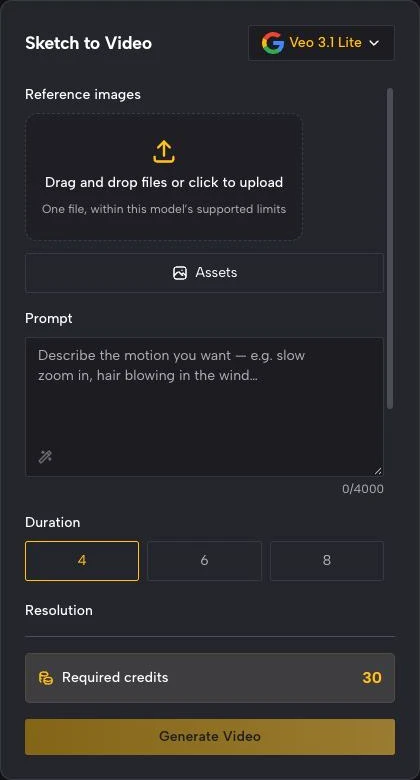
Sketch to Video with AI turns a flat drawing into a moving clip. Upload a doodle, line-art sketch, or storyboard frame, describe how it should move, and this sketch to video tool animates it — no drawing software or editing skills needed, and every export is watermark-free.

Sign in with Google — eligible Gmail or googlemail accounts get free signup credits, no card needed to start. Animate a sketch to video in seconds.

Free to startGoogle Sign-In RequiredWatermark-free outputMultiple AI models

See it in action

Turn a Sketch into an Animated Video

Real clips generated from a single drawing — see how sketch to video ai adds motion, expression, and camera moves to flat line art.

A hand-drawn character starts to blink, breathe, and shift its weight, turning a static doodle into a lively short.
Character doodle
A comic-style panel becomes animated with drifting clouds and a walking figure — a clean sketch to video cartoons look without frame-by-frame work.
Cartoon scene
A rough concept sketch animates into a short educational clip that walks a viewer through the idea step by step.
Whiteboard explainer
A single storyboard panel gains camera motion and subtle action, previewing how the finished shot will feel.
Storyboard frame
A drawn logo mark builds on with animated strokes and a gentle reveal for an intro or title card.
Line-art logo
A sketched scene comes alive as water ripples and light shifts, turning a still drawing into a moving backdrop.
Illustrated landscape
A hand-drawn character starts to blink, breathe, and shift its weight, turning a static doodle into a lively short.
Character doodle
A comic-style panel becomes animated with drifting clouds and a walking figure — a clean sketch to video cartoons look without frame-by-frame work.
Cartoon scene
A rough concept sketch animates into a short educational clip that walks a viewer through the idea step by step.
Whiteboard explainer
A single storyboard panel gains camera motion and subtle action, previewing how the finished shot will feel.
Storyboard frame
A drawn logo mark builds on with animated strokes and a gentle reveal for an intro or title card.
Line-art logo
A sketched scene comes alive as water ripples and light shifts, turning a still drawing into a moving backdrop.
Illustrated landscape

How it works

How Sketch to Video AI Works

Three steps take you from a flat drawing to a finished clip — free to start with signup credits, and every export is watermark-free.

How Sketch to Video AI Works
  1. 1

    Upload your sketch

    Sign in with Google, then drag in any drawing — a pencil doodle, inked line art, a cartoon panel, or a storyboard frame as a JPG or PNG. Clean, high-contrast sketches with a clear subject give the sketch to video ai more shape to animate, but even a rough phone photo of a napkin sketch works.

  2. 2

    Describe the motion

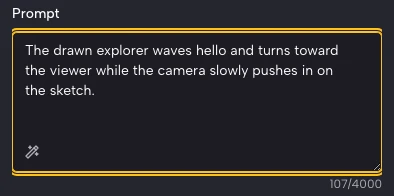
    Write a short prompt for what should move and how the camera behaves — "character waves, slow zoom in, gentle bounce" is enough to steer the render. Then pick an AI model and an aspect ratio (9:16 for reels, 16:9 for explainers) to match where you will post.

  3. 3

    Generate and download

    The AI generates new frames from your single drawing and returns a playable clip in seconds. Preview it, tweak the prompt for a different take, then download the finished animation — watermark-free — to share on TikTok, YouTube, or drop into a lesson or pitch.

What you can do

A Sketch to Video with AI Workflow Built for Motion

Prompt-driven animation

Describe the shot in plain language and this sketch to video ai animates your drawing to match — a character wave, a bouncing walk cycle, or a slow camera push across the scene. No keyframes, no timeline, no animation rig.

Try it with your sketch

Sketch to Video for Cartoons

Give a comic panel or character design real movement and expression. This sketch to video cartoons workflow keeps your hand-drawn style while adding blinks, gestures, and camera motion, so a flat cartoon reads like a finished animated short.

Animate a cartoon

Turn Sketches into Educational Videos

Turn sketches into educational videos that explain an idea visually — animate a whiteboard concept, a labeled diagram, or a process drawing into a short clip students actually watch instead of a static slide.

Make an explainer clip

Convert a sketch to video, free

Convert any drawing sketch to video online, free to start, and watermark-free. Every clip stays yours to download, so you can turn doodles, line art, and storyboards into animated videos for any project.

Convert a sketch to video

Why imgvid

Why Creators Use This Sketch to Video AI

A free-to-start sketch to video tool that focuses on real generated motion and watermark-free output, not a slideshow of your drawings.

Real AI motion, not a pan

The model generates new frames inside your drawing, so characters and scenery actually move — the animated look you cannot get from a slideshow that just slides across a static sketch.

Keeps your hand-drawn style

Your line work, shapes, and character design stay recognizable in the output, so the animation still looks like your sketch — only moving.

Great for cartoons

Sketch to video cartoons come out with expression and camera moves ready for reels, intros, and shorts, without frame-by-frame animation software.

Built for educational clips

Turn sketches into educational videos and explainers that hold attention — a moving diagram or whiteboard idea lands better than a static image in a lesson.

Fast enough to iterate

Most clips finish in under a minute, so you can try different prompts on the same drawing and pick the best take instead of waiting on a render queue.

Free to start, watermark-free

Sign in with Google and eligible accounts get free signup credits, with watermark-free clips and no card needed to begin — a sketch to video tool anyone can start using today.

Use cases

Turn Sketches into Educational Videos and More

From classroom explainers to cartoon shorts, here is what creators turn a sketch to video into.

Cartoon shorts from doodles

Animate a character doodle or comic panel into a playful short with movement and expression your followers will replay.

Cartoon shorts from doodles

Classroom explainer clips

Turn a whiteboard concept or labeled diagram into a short educational video that makes an idea click for students.

Classroom explainer clips

Storyboards into animatics

Give storyboard frames camera moves and action to preview how a shot or sequence will feel before you film or animate it.

Storyboards into animatics

Line-art logo reveals

Animate a drawn logo or title mark into a clean stroke-by-stroke reveal for a channel intro or brand bumper.

Line-art logo reveals

Illustrated social posts

Bring a sketched illustration to life with subtle motion so a flat drawing stands out in a busy feed.

Illustrated social posts

Concept art in motion

Add drifting, breathing movement to concept sketches and character designs for pitches, portfolios, and moodboards.

Concept art in motion

FAQ

Sketch to Video FAQ

Sketch to Video with AI is a tool that takes a single drawing and animates it into a short moving clip. You upload a doodle, line-art sketch, cartoon panel, or storyboard frame, describe the motion and camera move you want, and the AI predicts realistic in-between frames — so a flat drawing becomes a few seconds of animation, with no drawing software, keyframes, or editing skills required.

Turn Your Sketch into a Video

Sign in with Google and animate a sketch to video in seconds — free signup credits, watermark-free output.

Create your AI video