You and your pet
The easiest viral Migos AI video: you on one side of the mic, your dog or cat on the other.

Hotel Lobby AI recreates the Quavo & Takeoff Hotel Lobby performance from A COLORS SHOW with your two photos: the viral Migos AI trend from TikTok, in one click.
Per image · JPG, PNG or WebP · up to 20.0 MB · at least 300×300px · up to 6000×6000px · aspect ratio 1:2.5–2.5:1
Upload one photo per person, press Create, and get your Hotel Lobby clip.
The original
This is the 2022 Hotel Lobby performance by Quavo & Takeoff, released as Unc & Phew, that the hotel lobby ai trend remakes. Next to it, a version made with this hotel lobby ai video generator.
Original video embedded from the official COLORS YouTube channel. imgvid is not affiliated with COLORS, Quavo, Takeoff, or Migos; this is a fan-made AI remix tool.
Examples
Every clip below is a hotel lobby ai video made from two ordinary photos. The more unexpected the pair, the harder the Quavo and Takeoff Hotel Lobby remake hits.
How it works
Three steps, two photos, no prompt. This hotel lobby ai generator already knows the A COLORS SHOW set and the Quavo & Takeoff routine.
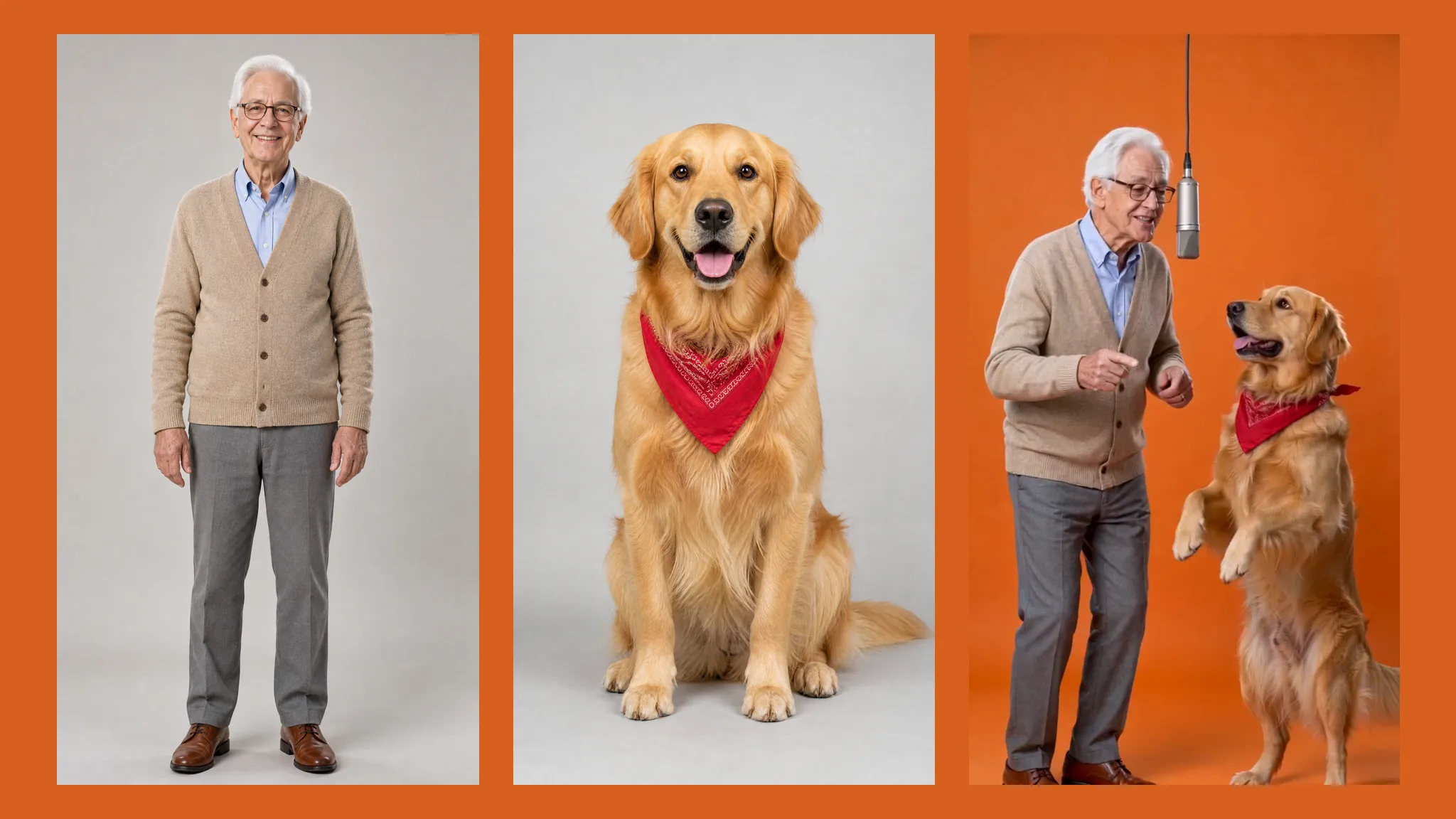
Add one photo per performer. The left slot takes the Quavo side and the right slot the Takeoff side at the start of the clip. Use two separate pictures, not a group shot; front-facing photos with the face and outfit visible work best, and a pet photo works in either slot.
You do not need a prompt: the hotel lobby ai video generator has the Hotel Lobby performance built in. Add an optional styling note if you want. It runs on Seedance 2.0 Fast at 480p or 720p: pick 480p for a quick take or 720p for a sharper one.
You get a 15-second vertical 9:16 hotel lobby ai video: one continuous take, two performers passing the mic. Download it watermark-free, add the official Hotel Lobby sound in TikTok or Instagram, and post it to the trend.
Migos AI
The Hotel Lobby trend is a Quavo & Takeoff duet. This migos ai video generator is built around that format.
Every hotel lobby ai video reads each performer from their own photo, so two identities never blend into one. That is why this migos ai video generator asks for two separate photos instead of one group shot.
Upload two photosThe hotel lobby colors show look comes with every render: the plain studio set and the single hanging mic from the Quavo and Takeoff Hotel Lobby performance. You only bring the faces.
Make a Hotel Lobby videoPut a pet in either slot and it stands at the mic like Quavo or Takeoff. Grandparents, babies, coworkers, and pets are what made the Hotel Lobby AI trend spread, because the least likely performers get the biggest reaction.
Try it with your petLike the Quavo hotel lobby performance, the clip is one shot with no cuts and no camera moves. One performer steps up while the other hypes them, then they switch.
Create your clipWhy two photos
Single-subject tools lock onto one face. A duet needs two clean references, which is what this hotel lobby ai generator is built for.
Each performer comes from their own photo, so the two identities stay apart for the whole Hotel Lobby clip.
Group shots make single-subject tools animate one person and leave the other standing still. Two photos fix that.
A back-and-forth duet at one hanging mic, the part of the original everyone recognizes.
A 15-second 9:16 hotel lobby ai video with generated sound. For the original Hotel Lobby song, add the official sound in TikTok or Instagram before you post.
The hidden template does the directing. An optional note changes outfits without breaking the format.
Start free and download clips without a watermark. Only upload photos you have the right to use.
Trend ideas
The pairings that get the most views in the Hotel Lobby AI trend. Pick two photos and make your own hotel lobby ai video.
The easiest viral Migos AI video: you on one side of the mic, your dog or cat on the other.
Send it to the family group chat. Grandparents as Quavo and Takeoff is the Hotel Lobby classic.
Two friends trading verses, perfect for a birthday post or an inside joke.
The pairing that started the Hotel Lobby AI trend. Pick cats with different coats.
A team account favorite, as long as both people agreed to be in it.
Partners as Unc & Phew make a Hotel Lobby clip that is funny and sweet at once.
FAQ
Hotel Lobby AI is the trend of remaking Quavo & Takeoff's "Hotel Lobby" performance from A COLORS SHOW. This ai rap video generator takes two photos and turns them into that duet: two performers trading verses at one hanging mic, in a 15-second vertical clip.
This hotel lobby ai video generator is free to try, and every download is watermark-free. A free hotel lobby ai video at 480p costs 465 credits and 990 at 720p; the exact cost shows on the Create button before you generate.
Neither, exactly. A hotel lobby character swap pastes faces into the original footage, and a hotel lobby ai filter works live in an app. This tool generates a brand-new Hotel Lobby performance from your two photos, so the result is your own clip, not an edit of the COLORS video.
Pets work in either slot. They stand at the mic and perform like Quavo or Takeoff, and the funniest Migos AI videos usually pair a person with an animal. For children, only use photos you have permission to share.
Each clip is 15 seconds, vertical 9:16, with generated sound, not the original Hotel Lobby song by Quavo & Takeoff. To use the real song, add the official Hotel Lobby sound in TikTok or Instagram when you post.
Yes, as a clearly labeled fan remix. Use only photos you own or have permission to use, do not present a celebrity face swap as real footage, and label the clip as AI-generated where TikTok, Instagram, or YouTube asks.
More tools
Two photos, the Quavo & Takeoff Hotel Lobby routine, fifteen seconds. Free to try, watermark-free output.
Create your hotel lobby ai video